Natural Scrolling dans Ubuntu

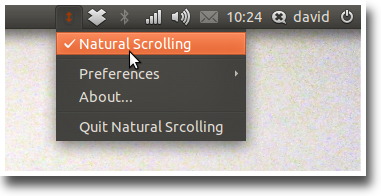
J’ai vite pris goût au Natural Scrolling (nâtchiourieul screulïngue, en anglais) sur Mac OS Lion. Au point que j’ai un mal de chien à m’en passer quand je ne suis pas sur Mac. Sur Ubuntu, il suffit d’installer… Natural Scrolling :
naturalscrolling-web

Il n’est pas disponible dans les dépôts officiels : ajoutez son dépôt PPA, puis installez-le. Ça se fait en trois commandes dans le Terminal :

sudo apt-add-repository ppa:zedtux/naturalscrolling
sudo apt-get update
sudo apt-get install naturalscrolling

Il ne reste plus qu’à cocher l’option dans le menu et à scroller le coeur léger.

(Via OMGUbuntu!)

Apple is the target

It’s clear that Windows is no longer the target [of Ubuntu]– personal computing and productivity computing are in the process of being reinvented, and being an effective replacement for Windows is no guarantee of relevance in the future.

Mark Shuttleworth: Corporate desktops and Ubuntu

Ce qui pourrait se traduire :

Il est évident que Windows n’est plus la cible [de Ubuntu] — l’informatique personnelle et professionnelle est en train de se réinventer, être un remplaçant crédible de Windows n’est plus l’assurance d’être pertinent dans le futur.